Algorithmic Investment Expert Advisors
Leverage the power of automated trading with our featured Expert Advisors (EAs) for the MetaTrader 5 platform. EAs can help automate your trading strategies, execute trades based on predefined rules, and manage risk.
Featured Expert Advisor: RiskEventTrader
RiskEventTrader is an Expert Advisor designed to potentially capitalize on market movements around significant economic data releases or news events. It allows for evaluating the significance of economic indicators based on their market impact and automates trade execution based on predefined parameters. It has been developed by pawan-pro / quantwater-tech-investments.
Access the Expert Advisor:
Important: The download link provides the source file. Please ensure you save it as RiskEventTrader.mq5. This .mq5 file is the source code. You will need to compile it in MetaEditor (part of MT5) to get the .ex5 (executable) file required by MetaTrader 5.
Using the RiskEventTrader EA: Key Concepts & Application
The RiskEventTrader EA is designed to implement trading strategies based on the analysis of economic data releases and their historical impact on asset volatility. Here’s how it aligns with key analytical concepts:
1. Volatility Analysis & Parameter Input
- The EA utilizes an understanding of how different economic releases affect market volatility. This involves analyzing historical data to identify patterns in market reactions (Max Movement, Min Movement in Volatility Units as per your PDF).
- Input Parameters: The EA takes specified parameters as input. These parameters are derived from your analysis of economic events and their typical impact. For example, based on historical data for an event like Non-Farm Payroll (NFP):
- If NFP typically results in a minimum movement of 0.5x Volatility Units and a maximum of 3x Volatility Units, you might configure the EA with a stop-loss multiplier of 1 (representing 1x Volatility Unit) and a take-profit multiplier of 3 (representing 3x Volatility Units).
- The EA uses concepts like Average True Range (ATR) to help define these Volatility Units, standardizing price movements. The Volatility Unit itself is often calculated as
(ATR * multiple) + Spread, where the multiple is typically around 1.5.
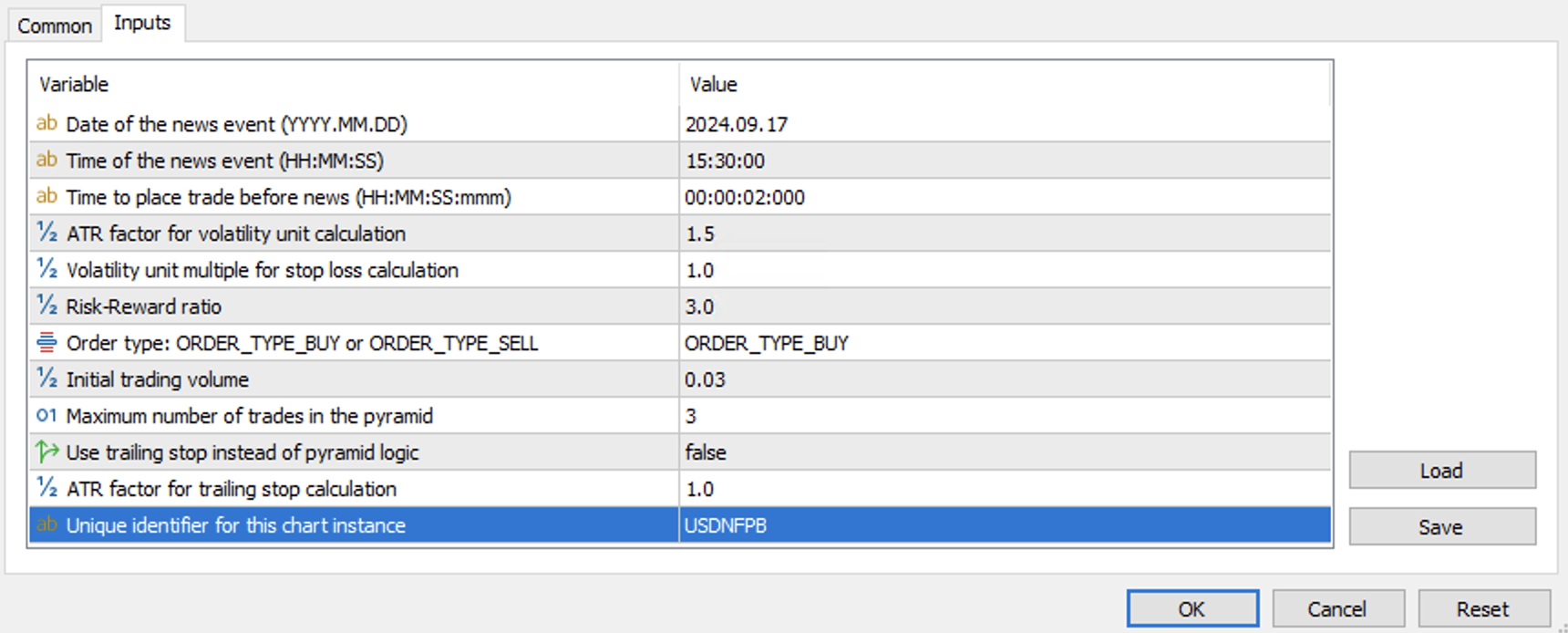
Example configuration of input parameters for the RiskEventTrader EA in MetaTrader 5.
2. Risk Management
- Risk per Trade: Adhering to standard trading guidelines, the risk amount per trade should generally not exceed a small percentage (e.g., 1-5%) of your trading balance. The EA may have an input for this (e.g., 'RiskPercentage'), or this should be manually considered when setting position sizes if the EA calculates lot size based on fixed stop-loss pips.
- Risk-Reward Ratio: The EA facilitates strategies aiming for a favorable risk-reward ratio (e.g., 1:3, 1:4, up to 1:6 or more). This, combined with an understanding of the win ratio from historical data or backtesting, helps determine appropriate risk levels, take-profit points, and position sizes.
- Example from Blog: For a $100,000 trading account, risking 5% per trade (via trading volume/position sizing currently) translates to a $5,000 stop-loss. With a 1:3 risk-reward, the take-profit would be $15,000. These risk parameters guide the EA's settings.
- The guiding principle is that a win ratio of at least 50% combined with a risk-reward ratio of over 2x can lead to positive expected cash flow, helping to minimize drawdowns and preserve capital.
3. Trade Automation on MT5
- Once configured with your analytical parameters (derived from studying economic data releases like those in your PDF), the RiskEventTrader EA automates the trade execution process on the MetaTrader 5 platform.
- An MT5 account is required, which can be obtained through a brokerage/securities dealer firm or by using a proprietary (prop) trading account.
Refer to the blog and annexure in any blog pdf for more information on using the RiskEventTrader EA effectively.
MetaTrader 5 Platform
The RiskEventTrader EA is designed for the MetaTrader 5 (MT5) platform, a popular and powerful trading platform used by millions of traders worldwide.
If you don't have MT5 installed, you can download it from the official website:
Download MetaTrader 5How to Install & Initialize an Expert Advisor in MT5
Follow these steps to install and run an EA like RiskEventTrader in your MT5 terminal:
- Download the EA File:Download the
RiskEventTrader.mq5file using the button above. Ensure it is saved with the.mq5extension. - Open MetaTrader 5 Data Folder:In MT5, go to
File > Open Data Folder. This will open a new window with the MT5 installation files. - Navigate to the Experts Folder:Inside the Data Folder, navigate to
MQL5 > Experts. - Copy the EA File:Copy the downloaded
RiskEventTrader.mq5file into thisMQL5/Expertsfolder. - Compile the EA:
- In the MT5 Navigator window (View > Navigator, or Ctrl+N), find 'Expert Advisors'. If
RiskEventTrader.mq5is not visible, right-click on 'Expert Advisors' and select 'Refresh'. - Find the
RiskEventTrader.mq5file in the list. - Right-click on it and select 'Modify'. This will open the MetaEditor with the EA's source code.
- In MetaEditor, click the 'Compile' button (or press F7). Check the 'Errors' tab at the bottom of MetaEditor for any compilation issues. If successful, an
RiskEventTrader.ex5file will be created in the sameMQL5/Expertsfolder.
- In the MT5 Navigator window (View > Navigator, or Ctrl+N), find 'Expert Advisors'. If
- Refresh or Restart MT5 (if needed):Sometimes, you might need to refresh the Expert Advisors list in the Navigator again or restart MT5 for the compiled
.ex5file to appear correctly. - Attach EA to a Chart:Drag the compiled EA (
RiskEventTrader.ex5) from the Navigator window onto the chart of the financial instrument you want it to trade. Alternatively, right-click the EA and select 'Attach to a chart'. - Configure EA Settings:A properties window will pop up.
- In the 'Common' tab, ensure 'Allow Algo Trading' is checked. You might also see options like 'Allow DLL imports' if the EA requires them (check EA documentation).
- In the 'Inputs' tab, adjust any parameters specific to the EA as needed. These are the parameters derived from your volatility analysis (e.g., stop-loss multiplier, take-profit multiplier based on Volatility Units, position sizing rules). Review the EA's documentation or comments in the code for guidance on these parameters.
- Enable Algo Trading:Ensure the main 'Algo Trading' button in the MT5 toolbar is enabled (it should be green with a play icon).
- Check the Journal/Experts Tab:Monitor the 'Experts' and 'Journal' tabs at the bottom of the Terminal window (View > Toolbox, or Ctrl+T) for any messages, initialization status, or errors from the EA. A smiley face (or a specific icon for the EA) on the top right of the chart indicates the EA is active. A sad face or crossed-out icon means it's not active.
Important Disclaimer
Trading financial markets with Expert Advisors, including the RiskEventTrader, involves significant risk and may not be suitable for all investors. Past performance of any trading system or methodology, including historical data analysis presented in our research or PDFs, is not indicative of future results. You could lose a substantial amount of money, potentially exceeding your initial investment.
The analysis of economic data and its historical impact (as shown in our PDF reports) provides insights but does not guarantee future market reactions. Market conditions can change, and unforeseen factors can influence outcomes. Always test EAs and strategies thoroughly on a demo account before using them with real funds. We recommend seeking advice from an independent financial advisor if you have any doubts. We are not responsible for any losses incurred from the use of this or any other Expert Advisor or trading strategy.